Introduction: Why Your Weekly Dose of Cyber Awareness Matters
For a quick cybersecurity tip of the week, start with this:
- Use strong, unique passwords for every account. Combine letters, numbers, and symbols. Even better, use a passphrase.
- Enable multi-factor authentication (MFA) on all your accounts. This adds a second layer of security, like a code from your phone, making it much harder for hackers to get in.
Welcome to your essential guide to staying safe online. Cybercriminals work relentlessly to find new vulnerabilities, which is why a regular cybersecurity tip of the week is so important.
For entrepreneurs, protecting your business from online threats isn’t just IT—it’s survival. Many think it won’t happen to them, but experts agree it’s a matter of “when,” not “if.”
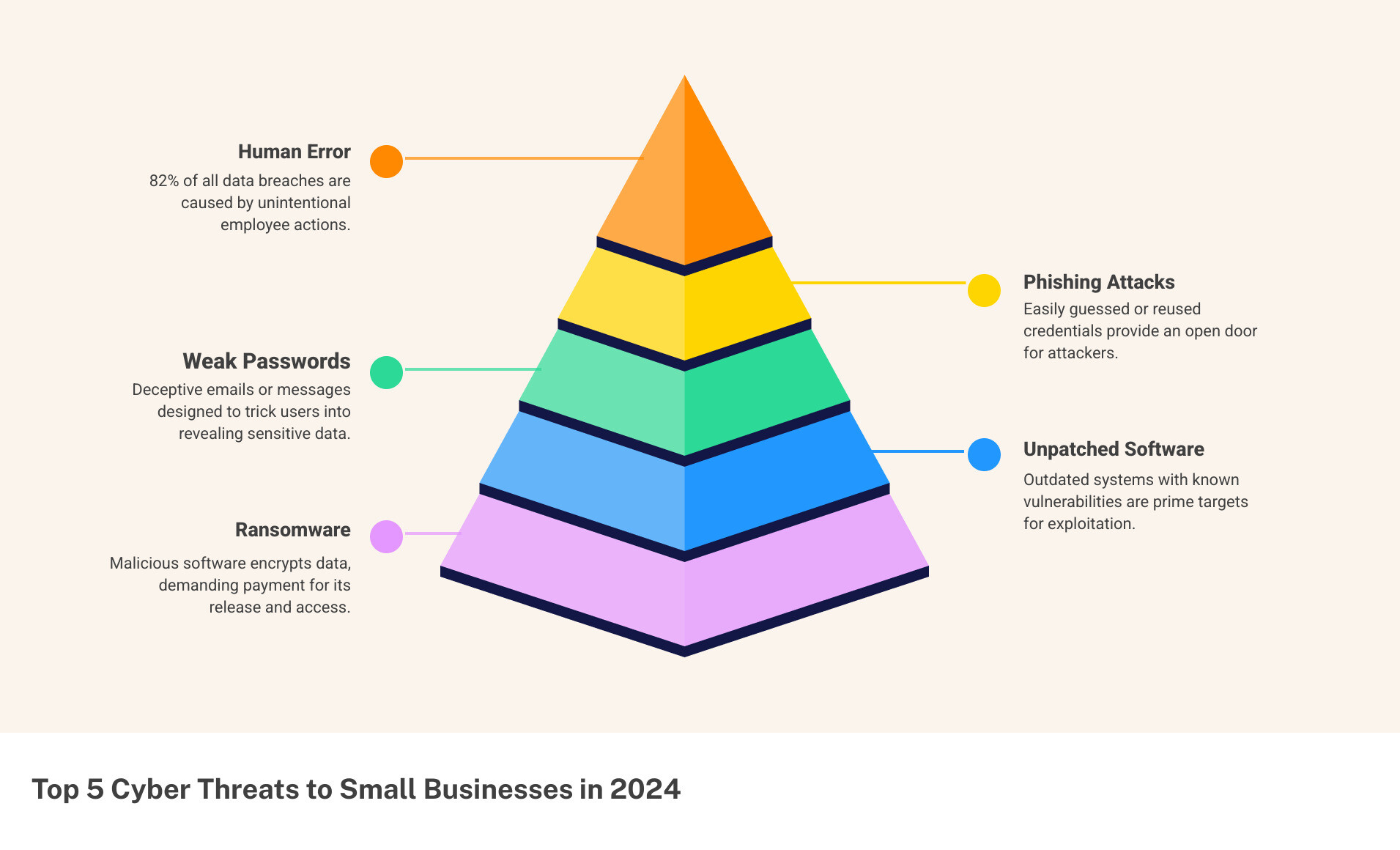
Did you know 82% of data breaches involve human error, like clicking a bad link or using a weak password? Small businesses are prime targets because they’re often seen as easier prey.
Cyberattacks cause huge financial losses, damage reputations, and can even close businesses. The average U.S. data breach costs millions and takes months to contain. Staying informed with small, consistent steps is your best defense. This guide offers practical ways to protect your business.
Cybersecurity is a constantly changing battlefield. What was secure yesterday might be vulnerable today, making continuous education a necessity. Incorporating a cybersecurity tip of the week into your routine is an effective way to build a robust defense.
As an entrepreneur, your plate is full. Adding “cybersecurity expert” to your title feels overwhelming. That’s why we provide bite-sized, actionable advice to empower you and your team to neutralize threats. Progress, not perfection, is the key. Every small step makes your business more resilient.
The Fundamentals: Your First Line of Defense Against Common Threats

Think of this section as your cybersecurity bootcamp! We’re going to dive into the most common online threats and arm you with the basic, yet powerful, practices to fight them off. These aren’t just good ideas; they are your essential everyday tools for digital safety.
Know Your Enemy: Common Cyber Threats
Before we can build our defenses, we need to know what we’re up against. Cybercriminals are always cooking up new ways to trick us, but some methods are tried and true. Here are the main dangers you should watch out for:
One of the most common attacks is Phishing, where criminals trick you into giving away sensitive information like passwords. They often impersonate trusted entities like your bank. Phishing can come via email, text message (Smishing), or phone call (vishing). These scams are on the rise, using tactics like fake copyright violation emails or bogus QR codes.
Then there’s Ransomware, a nasty type of software that encrypts your files and demands a ransom payment to open up them. Without payment, your data could be lost forever. Malware is a broader term for any harmful software—including viruses, spyware, and Trojans—designed to disrupt your system or steal information.
It’s super important to approach every message, email, or text with a healthy dose of skepticism. For a deeper dive into what to watch out for, check out our guide on phishing warning signs.
When you get a suspicious email, here are some key red flags to spot: First, watch out for a sense of urgency or threat demanding immediate action. Second, be wary of generic greetings and poor grammar; professional organizations use your name and write clearly. And third, always be careful with suspicious links or attachments. Before clicking any link, hover your mouse over it to see the actual website address. Be extra cautious with unexpected attachments.
Your First Cybersecurity Tip of the Week: Master the Basics
Now that we know the threats, it’s time to arm ourselves with the fundamental practices that form the bedrock of strong cybersecurity. This isn’t complicated, but it does require consistency.
Our first cybersecurity tip of the week is about Strong Passwords. Use unique, complex passwords for every single account. A strong password is at least 12-16 characters long with a mix of cases, numbers, and symbols. A “passphrase” is even better. You don’t have to memorize them all; password managers can help. Learn more about password management best practices.
Next, Software Updates. Those update notifications are your friends. They contain critical security fixes that patch weaknesses hackers exploit. Ignoring them is like leaving your front door open. Keep all software, including your web browser, up-to-date. For more reasons why keeping software updated is crucial, read our guide.
And yes, you absolutely need Antivirus Software for most devices, especially if you’re using a Windows PC. Good antivirus software constantly scans for anything suspicious and stops them before they can damage your system. Just make sure it’s always running and kept up-to-date.
Finally, a real game-changer: Multi-Factor Authentication (MFA). This adds a crucial second layer of security beyond your password. After typing in your password, MFA might ask for a code from your phone or a fingerprint scan. Even if a hacker steals your password, they can’t get into your account without that second step. Enable MFA on every single account that offers it—social media, banking, email, everything!
These fundamental steps are your starting point for a safer digital life. Think of them as your daily cyber hygiene. For even more detailed info about basic cyber hygiene tips, dive into our comprehensive guide.
Securing Your Digital World: From Smartphones to Smart Homes
Our digital lives extend far beyond our desktop computers. From the smartphone in your pocket to the smart thermostat on your wall, nearly every device we own is connected. While convenient, these personal and IoT devices are often overlooked entry points for attackers if not properly secured.
Here’s your cybersecurity tip of the week for these personal gadgets: Treat every device that connects to the internet like a mini-computer that holds sensitive data, because it probably does!
Lock Down Your Personal Devices
Our smartphones hold our banking apps, personal photos, and emails. Ignoring their security is like leaving your front door wide open.
First, always use a strong passcode, PIN, or biometric authentication (fingerprint or face ID) to lock your phone. Beyond that, scrutinize app permissions. Be selective and disable access to sensitive data, like location, for apps that don’t need it.
Have a mobile device action plan. If your phone is lost or stolen, what’s your next step? Enable remote wipe capabilities to erase all data from your device if it falls into the wrong hands.
Most modern smartphones also offer full device encryption. This feature scrambles all the data on your phone, making it unreadable to anyone without the encryption key. It’s a powerful layer of protection that’s often just a setting away. You can learn how to set this up for your device with our guides on How to encrypt Android devices and How to encrypt Apple devices.
Finally, be cautious on public Wi-Fi. Free networks at cafes or airports are often unsecured, allowing criminals to snoop on your data. Avoid sensitive activities like banking on public Wi-Fi, or use a Virtual Private Network (VPN) for encryption. Also, beware of “juice jacking” from public USB charging stations; stick to AC outlets or use a charge-only adapter.
Taming the Internet of Things (IoT)
Smart home devices, like smart speakers and security cameras, can become a backdoor into your network for attackers.
A huge vulnerability is default passwords. Many IoT devices ship with guessable passwords like “admin.” The first thing you should do with any new smart device is change its default password to something strong and unique.
Consider network segmentation for your smart devices. Set up a separate Wi-Fi network (a “guest” or “IoT” network) to isolate them from your main network. If an IoT device is compromised, the attacker can’t easily access your primary computers and data.
Just like your computer and phone, regular updates are vital for IoT devices. They receive firmware updates that often include critical security fixes. Enable automatic updates or regularly check for them manually. Finally, if your smart device has features you don’t use, like remote access, it’s a good idea to turn off unnecessary features. Fewer open doors mean fewer opportunities for attackers.
For more comprehensive Tips for securing the Internet of Things, check out our dedicated article.
Business-Specific Strategies: Protecting Your Company’s Assets

As an entrepreneur, you’re responsible for your entire team and your customers’ trust. The stakes are higher, but so are the rewards of getting it right. This section focuses on the specific measures business leaders must implement to safeguard their organization.
Create a Human Firewall
With 82% of data breaches involving human error, your employees can become your greatest strength—if you invest in making them security-savvy.
Employee education is an ongoing investment, not a one-time checkbox. Just as you’d train someone on your accounting system, you must train them in cybersecurity.
Weave regular security awareness training into your company culture. Your team needs to understand sophisticated phishing attempts, the danger of unknown USB drives, and how to spot when something feels wrong.
Here’s a powerful cybersecurity tip of the week for business owners: use phishing simulations. Send harmless, fake phishing emails to your staff. It’s an effective way to provide personalized training to those who click, turning a vulnerability into a learning opportunity.
Don’t forget to create an acceptable use policy that clearly outlines how company devices, networks, and data should be used. This sets clear expectations for secure behavior. For an Example of an Acceptable Use Policy, check out our template.
Verizon’s 2023 Data Breach Investigations Report found that 74% of cyberattacks involve human error. This shows that targeted, personalized training can have an enormous impact on your overall security posture.
Fortify Your Business Operations
Now let’s talk about protecting the digital backbone of your business.
Data backups are absolutely critical. Assume you will be hit by ransomware, hardware failure, or human error. Your backups determine whether you recover in hours or face a major disruption.
The gold standard is the 3-2-1 backup strategy: 3 copies of your data, on 2 different media types, with 1 copy off-site. This protects against cyberattacks and natural disasters. Secure your cloud backup accounts with strong passwords and MFA.
For cloud security, remember the shared responsibility model. The provider secures the infrastructure, but you are responsible for securing your data within it. This means proper configuration, strong authentication, and regular access reviews.
Access control is crucial. Implement the principle of “least privilege,” giving employees access only to the data and systems they need for their role. Update access immediately when an employee’s role changes or they leave the company.
For secure file sharing, invest in business-grade platforms that offer proper encryption and access controls rather than consumer-grade apps.
Finally, don’t forget about vendor security. Your business is only as secure as its weakest link. If you share data with third-party vendors, ensure they have strong cybersecurity practices and include security requirements in your contracts.
For more comprehensive information about basic cyber security tips custom specifically for businesses, dive into our detailed resources.
Building a Cyber-Resilient Routine: Tools and Habits for Ongoing Safety
Think of cybersecurity not as a chore you do once, but as a continuous journey. To truly protect yourself and your business, you need to cultivate good habits and use the right tools to stay a step ahead.
A Proactive Cybersecurity Tip of the Week: Build Strong Habits
These small, consistent actions can make a huge difference in your online security.
A great cybersecurity tip of the week is to regularly review your account access. Check which apps and services are connected to your social media, email, or cloud accounts. Remove access for anything you no longer use or don’t recognize.
Another smart habit is to delete old accounts you no longer use. Every old account is a potential weakness that could expose your information if breached. Ready to clean house? Learn How to find and delete old unused accounts.
Don’t forget to monitor your financial statements closely. Regularly check your bank and credit card statements for any suspicious transactions. Setting up alerts for unusual activity can give you an early warning of identity theft.
Finally, make it a habit to check for data breaches. Use a free service like Have I Been Pwned? to see if your email address has appeared in a known data breach. If it has, immediately change the password for that account and any others where you’ve reused it. It’s a quick way to stay informed. You can also learn more about how to Check if your email has been in a data breach.
Essential Tools for Your Security Toolkit
Beyond good habits, some tools are modern necessities for cybersecurity.
First, use a password manager. It’s the best way to use strong, unique passwords for every account without having to memorize them. A password manager generates and stores complex passwords securely, and you only need to remember one master password. This tool is a game-changer for password hygiene. See our guide on A guide to choosing a password manager.
Next, use a Virtual Private Network (VPN). A VPN encrypts your internet connection, creating a secure tunnel for your data. This is essential when using public Wi-Fi, as it protects your information from prying eyes. For entrepreneurs who travel or work remotely, a VPN is a must-have. Find out Why you should use a VPN.
Lastly, consider credit monitoring services. They alert you to suspicious activity on your credit report, like new accounts opened in your name. This is a vital layer of defense for detecting identity theft early.
Emergency Response: What to Do if You’ve Been Hacked
Despite our best efforts, cyber incidents can still happen. No system is 100% foolproof. Having a solid plan can mean the difference between a minor inconvenience and a business-ending disaster.
The most important thing to remember? Don’t panic. Acting quickly and methodically will help you regain control. This is your emergency playbook.
Your Immediate Action Plan
If you suspect a cyberattack, every minute counts. A quick response can significantly limit the damage.
Isolate the device immediately. If a device is compromised, disconnect it from the internet. Unplug the ethernet cable, turn off Wi-Fi, or power it down. This prevents malware from spreading and stops hackers from accessing more data.
Change your passwords – starting now. Start with the compromised account, then change passwords for any accounts that used a similar one. This is why unique passwords for every account are critical. Create new, strong, unique passwords for each account.
Contact your financial institutions. If financial information was involved, call your bank and credit card companies immediately. They can freeze accounts, cancel cards, and monitor for fraud. Most have 24/7 fraud hotlines.
For more comprehensive guidance, check out our detailed resource on What to do if you were scammed.
After these immediate steps, contact key people. Your IT provider or department should be your first call. Your bank and financial institutions come next. Finally, you may need to contact affected customers or clients if their data was compromised, as you might have legal obligations to notify them.
Reporting and Recovery
Once you’ve contained the immediate threat, focus on reporting and recovery.
Report the incident to authorities. Don’t be embarrassed—you’re the victim. Filing a report helps prevent others from being scammed, creates an official record for insurance, and aids the fight against cybercrime. Learn more about how to Report fraud to the appropriate authorities.
File a police report, especially for identity theft or significant financial fraud. This documentation is valuable when disputing fraudulent charges.
Report to cybercrime agencies. File reports with agencies like the FBI’s Internet Crime Complaint Center (IC3) or the Federal Trade Commission. They track cybercrime and can sometimes take action. Visit our Cybercrime reporting portal for specific guidance.
Consider freezing your credit if your personal information was compromised. This prevents new accounts from being opened in your name without your consent. It’s one of the most effective ways to stop identity thieves. Our guide on How to freeze your credit walks you through the process.
Recovering takes time and persistence. Each step helps restore your security and reduces the attack’s long-term impact. Treat this as a learning experience to build even better defenses for the future.
Conclusion: Make Cybersecurity a Weekly Priority
So, we’ve come to the end of our journey today, but in cybersecurity, it’s truly just the beginning! Think of cybersecurity not as a chore you do once and forget, but as an ongoing commitment – a bit like tending a garden. It needs regular care and attention to truly flourish and keep out pests.
That’s why embracing a regular cybersecurity tip of the week is so powerful. By taking small, consistent steps, you’re not just patching a problem; you’re building a robust, ever-strengthening shield around your digital world. This steady approach helps you adapt to new threats and keep your defenses strong.
For you, as an entrepreneur, protecting your hard work and dreams is paramount. Staying informed and proactive isn’t just a good idea; it’s your most powerful tool in navigating the ever-changing landscape of online threats. Every little bit of knowledge you gain, and every secure habit you form, makes your business more resilient.
And here at TheEntrepreneurs.net, we’re right there with you. We’re dedicated to being your trusted partner, delivering the clear, actionable insights you need to not just survive online, but to truly thrive securely. Ready to make cybersecurity a regular, easy-to-manage part of your business routine?
Learn more about how to stay safe online with our essential cybersecurity tips.